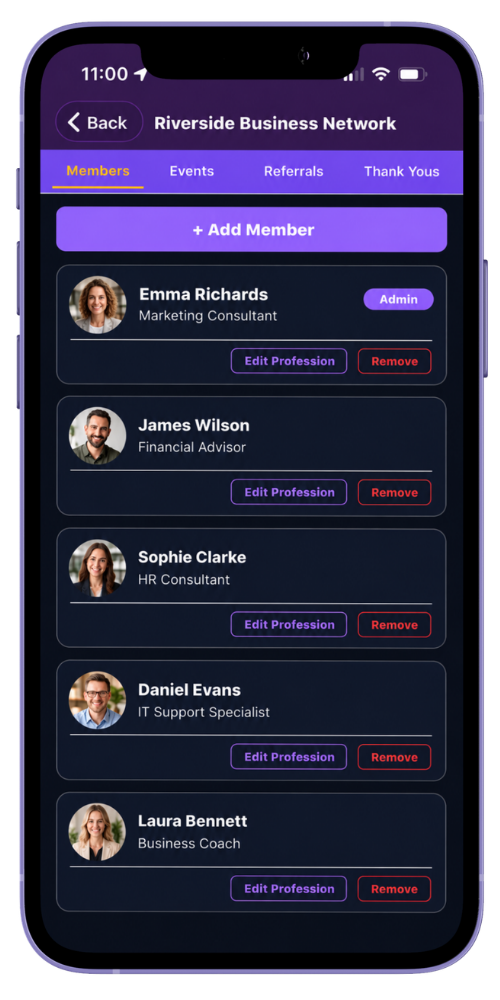
Group administrators can add people directly, invite them by email or generate a join code for prospective members. Join-code requests remain pending until an administrator approves or rejects them.
Use the organisation view when the person needs access to several groups in the same organisation. One organisation user can belong to multiple groups.
Share invitation links and join codes only with the intended people. A join code requests access; it does not bypass administrator approval.
Step by step
Maintain the group membership
-
Open the group’s Members area
Choose the group you administer and review its current member directory.
-
Choose how the person will join
Add or invite the person directly, or generate the group join code so they can submit a request.
-
Review pending requests
Check the person and approve or reject their pending membership.
-
Set the appropriate role
Keep ordinary membership and group administration responsibilities with the right people.
-
Add useful professional context
Record the member’s profession for that group where it helps the directory.
-
Review changes promptly
Remove group access when a person no longer belongs to the group, following your organisation’s normal membership process.
Common questions
Before you begin
Does a join code grant immediate access?
No. It creates a pending membership request that a group administrator can approve or reject.
Can the same person belong to several groups?
Yes. Organisation administrators can assign one organisation user to multiple groups within that organisation.