The challenge
Finding a time can take longer than the meeting
One-to-one meetings help members understand each other’s businesses, but arranging them can involve repeated messages and unclear availability.
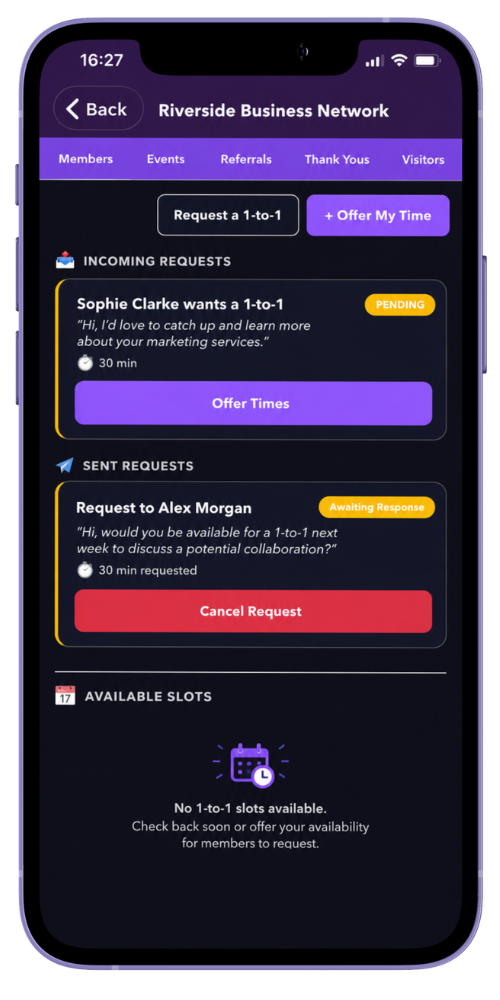
Members need a simple way to offer a time or request a meeting while keeping the confirmed details visible.
How MyNetworx approaches it
Two practical ways to schedule
A member can publish an available slot for another group member to book. The slot can include its duration, location, video link and notes.
Alternatively, a member can send a direct request. The recipient proposes up to three possible times and the requester confirms the option that works. Confirmed meetings appear in the members’ upcoming diary.
In practice
Choose the approach that suits the conversation
Both routes lead to a clear meeting record for the two members involved.
Offer availability
Publish a specific time that another member can book.
Request a meeting
Ask a member for a one-to-one and let them suggest suitable times.
Confirm the details
Select a proposed time and keep the duration and meeting place together.
See what is coming up
Confirmed one-to-ones appear alongside events in the upcoming diary.
Benefits
More time for the relationship
Clear next step
Members can move from an initial request to an agreed time in one workflow.
Useful context
Duration, location and an optional video link stay with the meeting.
One diary view
Upcoming group events and confirmed one-to-ones can be reviewed together.
Common questions
Questions about this feature
Can a member offer a bookable time?
Yes. Members can publish an available one-to-one slot for another member in their group to book.
How many times can be proposed for a direct request?
The recipient can propose up to three possible times. The requesting member then confirms one available option.
Can online meeting details be included?
A meeting can include a video link where appropriate, as well as a physical location and notes.