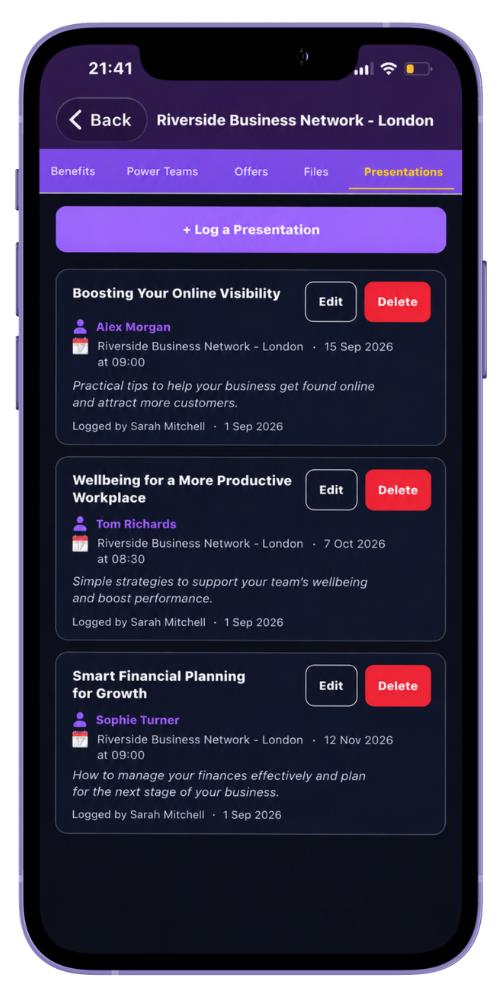
MyNetworx lets authorised group administrators record member presentations against events. The presentation record includes a title, the presenting member and optional notes.
The assigned member can be notified according to their notification preferences. Keep notes suitable for the presenter and other authorised group users who can view the schedule.
Step by step
Add a presentation to an event
-
Create the event first
Make sure the relevant upcoming group event exists in MyNetworx.
-
Open Presentations
From the group, open the presentation area and select Log a Presentation.
-
Choose the event
Select the event where the presentation is planned.
-
Assign the presenter
Choose the member who will deliver the presentation.
-
Add the title and notes
Enter a clear presentation title and only the supporting notes the group needs.
-
Save and review
Check that the presentation appears with the correct event and presenter.
Common questions
Before you begin
Does the event need to exist first?
Yes. In the mobile scheduling workflow, the administrator selects the relevant event when logging the presentation.
Can the presentation be changed?
Yes. An authorised user can update the title, notes, event or presenter, or remove the presentation record.