In MyNetworx, the visitor workflow records the person and can associate them with an upcoming event. It does not send the external invitation or confirmation message.
Speak to the visitor first, use only the details needed for the visit, and follow your organisation’s approach to handling personal information.
The member or organiser remains responsible for invitation communication outside MyNetworx. Administrative access is required to assign a visitor to an event in the mobile workflow and to manage visitor status.
Step by step
Add a planned visitor
-
Open the group’s Visitors area
Choose the group that the person plans to visit.
-
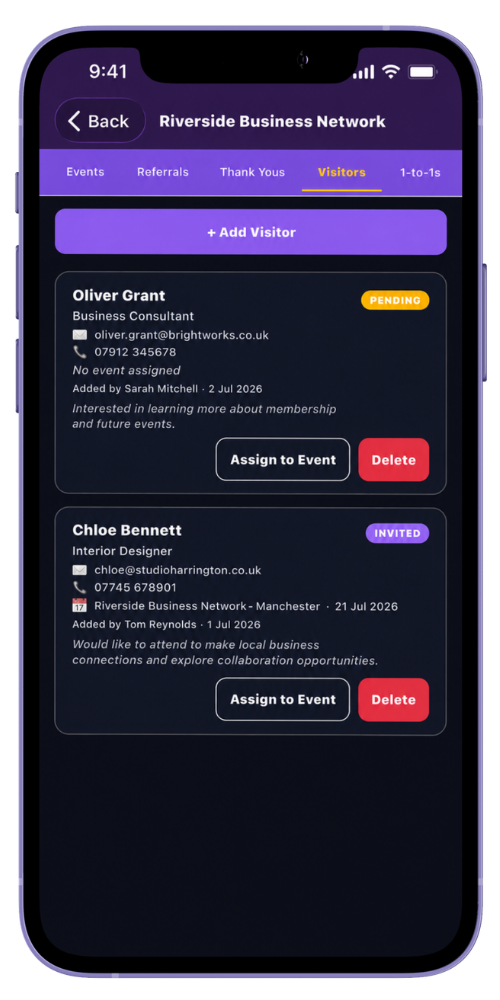
Select Add Visitor
Start a new visitor record.
-
Enter the relevant details
A name is required. Company, email, phone and notes are optional and should be used only when appropriate.
-
Save the visitor
The visitor is added in a pending state.
-
Associate the event
A group administrator can assign the visitor to an upcoming event. The visitor list then shows the event and visit status.
Common questions
Before you begin
Will the visitor receive an email from MyNetworx?
No. Adding or assigning the visitor creates the internal group record; it does not send an invitation email.
What visitor statuses can organisers use?
The web administration flow supports pending, invited, confirmed, attended and cancelled.